

Your data and privacy
The assistant is part of your provider’s product: your provider is the company whose product shows it, and your provider decides how your data is handled, within its own privacy policy. This page describes what the assistant itself stores when you use it, what it hides, and who can see what. For anything about keeping, exporting or deleting your data, your provider is the one to ask.
How it works
Section titled “How it works”What is stored about you
Section titled “What is stored about you”| Data | What exactly |
|---|---|
| Your account | Your customer ID from your provider’s product, your name and email, your company, your role, the type of sign-in you chose, failed sign-in attempts and lock times, whether your access is switched off, and your choice on the memory checkbox |
| Your PIN or password | Only as a one-way hash, which cannot be turned back into the PIN or password |
| Your sign-ins | For each sign-in: the assistant you signed in to, your IP address, your browser, and when the session started, ended or was revoked |
| Your conversations | Every chat with its title, your messages, the assistant’s answers, tables and charts, and files you attached |
| AI processing records | The text sent to the AI models for each answer and the text they returned, including your messages |
| Actions the assistant took | Each call to your provider’s systems: what was asked, the address called, the answer and how long it took; never sign-in details or keys |
| Blocked messages | A message stopped by your provider’s safety rules, with the reasons, stored without your name or the chat it came from |
| Ratings | Thumbs up or down on answers, with the reason and comment you gave |
| Notes the assistant remembers | Notes learned from your own chat messages, and notes your provider set for your company |
| Background runs | Each run, its steps, approvals and result, and a detailed activity log |
| Notifications | Your choices on Notifications, your Telegram chat, your member ID in Slack or your Teams account once you connect them, and a record of each notification sent to you with the channel, your address and the subject |
| Summaries | Summaries of conversations and of how you tend to use the assistant, which your provider uses to understand and improve the service |
| Sign-ins to your provider’s services | Details you enter when the assistant asks to act as you in another service, kept encrypted for your account so it can do so. They are decrypted only when the assistant uses that service for you and are never shown back to you in full |
In your browser, the assistant keeps your sign-in session, a visitor ID, and your choices for theme, language and the portal menu. The session stays valid for 12 hours, or 7 days if you ticked the option to stay signed in, even after you close the browser. On a shared computer, select Log out at the bottom of the portal menu when you are done.
What is masked
Section titled “What is masked”Your provider can set rules that hide sensitive values, such as email addresses or account numbers, in data the assistant fetches from your provider’s systems. Hidden values appear shortened, for example “ja****om”, before the AI sees them and before they are recorded. Your own messages are not masked. Do not type passwords, card numbers or other secrets into the chat. Notes the assistant remembers have personal data such as contact details removed, or are not kept.
Who can see it
Section titled “Who can see it”| Who | What they can see |
|---|---|
| You | Your chats, your notes on Memory, your runs on Agent runs, your profile, and your company’s shared material your role allows |
| Admins of your company | The member list (name, email, customer ID, role, access), every background run of your company except other people’s personal workflows, with its result and waiting approvals, and your company’s documents, skills, shortcuts, settings and notification channels |
| Your provider’s team | Your account record, your chats, the notes the assistant keeps about you (which they can also delete), your runs, the AI processing records, the actions the assistant took, your ratings and blocked messages |
| Other companies using the same assistant | Nothing of yours |
| The AI models your provider uses | The text of each turn, so they can answer; which models are used depends on your provider |
Admins of your company cannot see your chats, your notes or your memory choice.
Data requests
Section titled “Data requests”To ask what is held about you, to have something deleted, or to close your account, contact your provider. The assistant has no button for exporting your data or deleting your account. Whether AI models keep or learn from your conversations depends on your provider and the AI services it uses; ask your provider.
Example
Section titled “Example”Rosie Kendall, an Admin at Sample & Partners Ltd, uses the assistant in the billing product her company gets from Demo Ltd, its provider.
| Rosie does | What is stored | Who can see it |
|---|---|---|
| Asks “Which invoices are overdue?” | The chat, her message, the answer, the AI processing record, and the call to the billing system | Rosie; Demo Ltd’s team |
| Says she prefers amounts in GBP | A note under Preference on Memory | Rosie; Demo Ltd’s team. Not Edward, her co-Admin |
| Approves a credit note in a run of a company workflow | The run, the step and her decision | Rosie, Edward and every Admin of Sample & Partners; Demo Ltd’s team |
| Unticks Let the assistant remember things about me | Her choice | Rosie. Existing notes stay until she forgets them |
Jasmine Hicks at Example Studios, another company using the same assistant, sees none of this.
What it does not do
Section titled “What it does not do”- It does not show your chats or notes to other people in your company, Admins included.
- It does not share anything of yours with other companies that use the same assistant.
- It does not show your PIN or password to anyone, your provider’s team included.
- It does not mask what you type yourself.
- It does not delete your notes when you switch remembering off; use Forget on each one.
- It does not offer a way to export your data or delete your account; your provider handles these requests.
Where you see it
Section titled “Where you see it”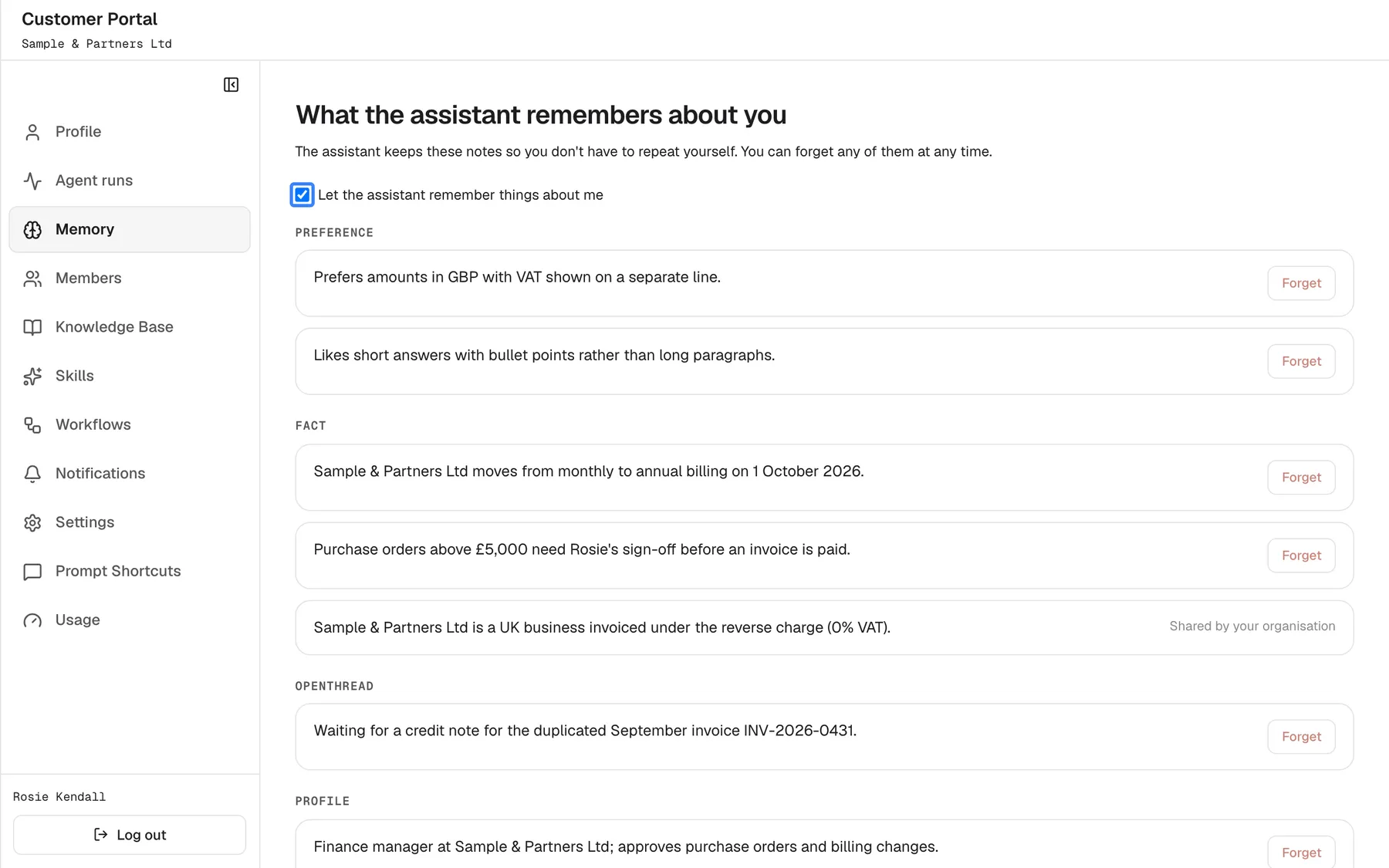
What this screenshot shows
- Screen
- What the assistant remembers about you (/?mode=portal)
- Highlighted
- checkbox “Let the assistant remember things about me”, page-top, ticked. off = no memories used or stored
- Also visible
- Notes grouped by category with portal.memory.forget; one portal.memory.sharedByOrganisation note
- Purpose
- privacy control over memory
| What | Where |
|---|---|
| Your notes and the memory checkbox | Memory |
| Your name, email and customer ID | Profile |
| Your chats, and deleting one | The chat history, opened with Open chat history in the chat’s top bar; see Chat history and activity |
| Background runs and their results | Agent runs |
| Who in your company can see what | Members (Admins) |
| Signing out | Log out at the bottom of the portal menu, under Configure |